Stop Scrubbing,
Start Remembering.
Most of what you watch fades within a day. ClipMark's Active Recall quizzes you on the moments you saved before replaying them — turning hours of idle watching into minutes of active mastery.
Passive Consumption (Bad)
“Where was that part? *scrubs timeline for 15 minutes*”
The ClipMark System
“Playing 4 peak moments in 6 minutes. System locked in.”
Don't just rewatch it.
Try to remember it.
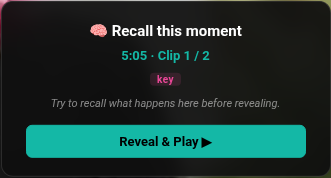
Rewatching feels like studying, but recognition isn't recall. ClipMark shows you the timestamp and hides your note — so you have to retrieve it before the clip plays.
Included free: 25 moments enrolled at a time, 30 reviews a month. No card, no trial clock — the same numbers printed on the pricing page.
Spaced, not random
Every saved moment starts on a 1 / 3 / 7-day schedule and surfaces in a "due for recall" queue when it's ready.
Remembered it? Wait longer
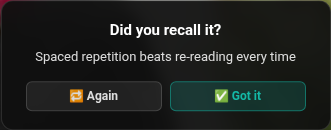
Each "Got it" doubles the next interval — up to 60 days — so easy material stops stealing your time.
Blanked? See it tomorrow
"Again" resets the streak and brings the moment back the next day, until it finally sticks.
That loop is the whole product. It’s free to try.
Add to Chrome — FreeFree: unlimited bookmarks stored locally, 25 Active Recall cards, 30 reviews a month. No card, no trial clock.
Keep your deck. Add the moment.
ClipMark isn't trying to replace the deck you've spent years building. Anki can't bookmark and replay the exact second a concept was explained — that's the part we add. Export your clips and every card links straight back to the source.
- One-click export to an Anki-importable file (Front / Back / Tags) — one a month free, unlimited on Pro
- Every card carries a “▶ Replay the moment” link to the exact second
- Your ClipMark tags come across as Anki tags
- Export from the extension or the web dashboard
Exported card
FRONT
Spaced repetition beats re-reading every time
BACK
Study Skills 101 — 5:05
▶ Replay the moment
One job, whatever you're studying
A lecture series, a language course, a three-hour conference talk — ClipMark does the same thing with all of them: mark the moment, then make yourself recall it later.
Lectures and course series
A forty-video series is not something you rewatch. Mark the moments that carry the concept — a Step 1 lecture, a recorded seminar, an exam-board revision channel — and let the review schedule bring each one back before you forget it.
Technical deep dives
Stop “tutorial hell.” Capture the exact second a pattern clicks, then get asked about it again a week later — which is the difference between having watched the talk and knowing the thing.
Long talks and podcasts
Pull the three moments that actually mattered out of a three-hour interview, with an on-device AI draft of each — and keep them somewhere that asks you about them again.
Whichever one you are, step one is the same keystroke.
Add to Chrome — FreeAlt+B while the video plays. ClipMark asks for two hosts — youtube.com and its own sync domain — and AI notes run on Chrome's on-device model.
✦ Smart Summary
Drafts your note from the transcript around the timestamp.
✦ Post Insights
Turns a set of saved clips into a draft post you can share.
The AI runs inside your browser. Not on our servers.
You pick the moment. Chrome's on-device AI reads the transcript around it and drafts the note, so saving a clip costs you a keystroke instead of a paragraph. It runs in your browser, on the free tier — nothing here is behind Pro.
* AI features use Chrome's built-in AI (Gemini Nano). Availability is subject to Google's support and may vary by Chrome version.
See what Pro addsThe Curator's Journey
Three steps to turn passive watching into active, searchable knowledge.
Bookmark Instantly
Hit Alt+B as you watch. No distractions, no friction — just capture the moment.
Learn moreOrganize with AI
ClipMark drafts a note from the transcript, using Chrome's on-device Gemini Nano.
Learn moreRecall It Until It Sticks
Active Recall brings saved moments back on a spaced schedule and quizzes you before replaying the clip.
Learn moreBuilt for Your Ecosystem
Four things we refuse to get wrong.
The player stays clear, the free tier stays honest, the permissions stay narrow, and the thing that makes it stick is built in.
Lives in the side panel, not on top of your video
ClipMark opens in Chrome’s own side panel beside the player. Nothing floats over the video, nothing covers the controls, and YouTube’s keyboard shortcuts keep working — ClipMark only claims Alt+B to save, and [ / ] to step between clips while you’re actively revisiting.
A free tier with the numbers printed on it
Free means unlimited bookmarks stored locally, on-device AI notes, 25 Active Recall cards, 30 reviews a month, and 10 Anki exports a month — no card, no trial clock. Those are the real limits, listed on the pricing page rather than discovered after you install.
Two hosts. That’s the whole permission list
ClipMark asks for youtube.com and clipmark.mithahara.com — its own sync domain — and nothing more. It cannot read your banking tab, your email, or any other site, because it was never granted them. AI notes run on Chrome’s on-device model, so transcripts aren’t shipped anywhere for that.
Your note is the question. The clip is the answer.
Tools that quiz you on a video generate the questions themselves, from the transcript. ClipMark does the opposite: it hides the note you wrote and replays the exact second, so you check your own recall against the source. Every saved moment goes on a schedule — 1, 3, then 7 days, doubling up to 60. That retrieval loop is the product, not a bullet point.
Switching from an extension that stopped getting updates? Read the migration guide.
Two permissions, real free-tier numbers, no card.
Add to Chrome — FreeWorks on Chrome, Edge and Brave. Free keeps unlimited local bookmarks, 25 Active Recall cards and 30 reviews a month.
Simple pricing. Absurdly affordable.
Start free, forever. Upgrade when you're ready — from $7.99 USD/mo for a permanent second brain.
On the roadmap — not included yet
On the roadmap — not included yet
Founding price — lock in lifetime access at $99.99 USD before it goes up.
On the roadmap — not included yet
7-day money-back guarantee · prices in USD, local tax added at checkout where applicable · no hidden fees · cancel anytime — your clips stay yours.
Questions? We have answers.
Can I cancel my subscription at any time?
Absolutely. If you cancel, your Pro features will remain active until the end of your current billing period. No hidden fees or lock-ins.
How does AI Auto-fill work?
When you save a moment, ClipMark reads the transcript around that timestamp and drafts a short note for you. You can edit it before saving. It runs on Chrome's built-in on-device model and is free — it is not a Pro feature.
How does Active Recall decide what to show me?
Each saved moment gets a review schedule (1, 3 and 7 days to start). When a moment comes due, Active Recall shows you the timestamp and tags but hides your note, so you have to remember it before you reveal and replay the clip. Answer "Got it" and the next interval doubles, up to 60 days; answer "Again" and it comes back tomorrow.
Does ClipMark replace Anki?
No — it feeds it. Anki can't bookmark and replay the actual moment from a lecture, which is exactly what ClipMark does. Pro users can export their clips as an Anki-importable file, and every card links straight back to the second it came from, so you keep the deck you already trust.
What happens to my clips if I downgrade?
Your data is yours. You will always have access to your existing clips, even if you downgrade to the Free tier. You just won't be able to add more beyond the free limit.
Do you offer educational discounts?
Yes! We support students and educators. Email support from your academic address — .edu, .ac.uk, .edu.au and other university domains all qualify — and we will send you a discount code.
How reliable are the AI features?
AI features run on Chrome's built-in AI model (Gemini Nano), processed locally in your browser — your data never leaves your device for AI tasks.
How remembering actually works here
The retrieval loop, the review schedule, and the road out to Anki — each explained on its own page.